
Category shelves of the Kakobuy Spreadsheet
Sixteen shelves of real finds, each card linking to a listing you can hand to the agent. Start wide, narrow by category, and read the notes for the boundary each category trips first.
Policy examples captured 10 October 2026. Check the live terms for your order; tutorial screens show older interface examples.
All sixteen shelves
Tiles link to live category pages and search feeds. Prices are in yuan on the listings; the estimator converts shipping separately.
 Electronics & gadgetsThe category where free inspection explicitly checks the least.Category
 WatchesAppearance-only inspection; movement checks are not part of QC.Category
 FragranceConfirm fragrance ingredients and route acceptance before ordering.Category
 Sunglasses & framesCases count as packaging; sealed cases are not opened at inspection.Category
 Jewellery & small piecesTiny parcels sit furthest from any route minimum weight.Category
 BeltsSmall, dense, and easy to slot into a parcel that needs grams.Category
 Caps & hatsCrushable or not decides how the warehouse can pack them.Category
 Bags & carryallsPacked dimensions matter for bags, including soft-packed ones.Category
 Coats & puffersHeavier pieces; weight drives the shipping line you can actually use.Category
 SneakersPairs where the seller photo set matters more than the listing title.Category
 Hoodies & fleeceFleece adds grams fast; check the weight note before you plan a parcel.Category
 DenimUse the selected denim item’s measured weight when planning freight.Category
 Track pantsCompare the seller’s size chart with a pair you own.Category
 Jerseys & kitsCompare the chosen cut, measurements and actual item weight.Category
 Tees & printsLight items that rarely reach a route minimum on their own.Category
 Women's picksA search feed rather than a fixed shelf; refine by garment type.Search results
From shelf to order
How to judge a listing before you commit
A card tells you four things worth checking in order: the photo set (seller studio shots or buyer phone shots), the price in yuan, the seller behind the listing, and how many near-identical cards surround it. The same photo appearing under five sellers at five prices is normal on these shelves; it means the image travelled, not that the factory did. Pick the listing, not the picture.
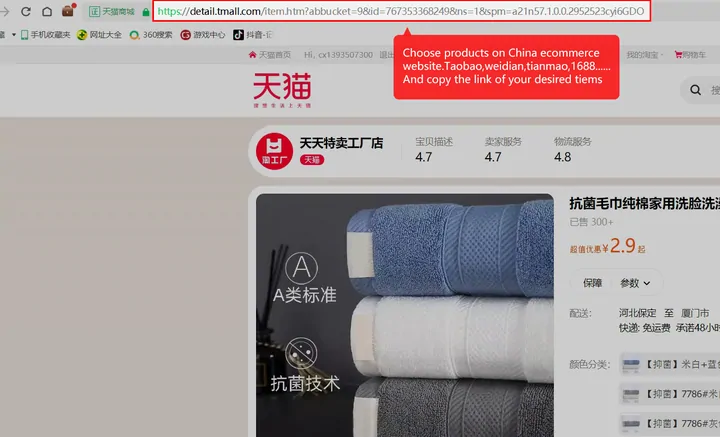
Open the card, identify the seller listing, and paste its exact product URL into Kakobuy. Compare the imported specification with the source. The tutorial names four marketplaces for search; unsupported or unreadable items may need a manual form with different conditions. See the product-link and manual-order checks.
The copy-link habit
The official tutorial teaches link-first ordering: find the item anywhere, copy the URL, let the agent resolve it. Keyword search exists inside the agent too, but it reads only the four crawled marketplaces, so a link is the more reliable handle for anything found on a shelf here.
Use this guide's search for product, brand or seller keywords. Paste the marketplace product URL into Kakobuy itself to begin an order.
Category habits
Shelf notes that save a reorder
- Sneakers, jackets, hoodies. The heavy shelves. One jacket can carry a parcel past a 2,000 g route minimum on its own; see the minimum weights before splitting orders.
- Jewellery, belts, eyewear. The light shelves. Light parcels may fall below some route minimums. Compare eligible routes at the packed weight rather than adding products simply to reach a cheap-looking row.
- Watches, electronics. The shelves where the free check reads appearance only. A working movement or a working chip is outside its scope; the inspection page lists what that means per purchase.
- Perfume. A route accepting some liquids does not establish acceptance of fragrance, alcohol or an aerosol. Confirm the actual ingredients, packaging and destination with the selected route before purchase.
Womenswear runs as a search feed rather than a fixed shelf, so refine it by garment type once inside. For jerseys, compare the selected cut and measurements; use the actual item weight once available.
How to use the search and category tools
- Start broad: try a product type such as hoodie, then narrow by seller, model or cut. A search term is not a stock guarantee.
- Compare the variant: check colour, material, size chart and quantity on the actual listing. The card image may show several options.
- Save the exact product URL: keep the seller and selected specification with it. Send the URL to Kakobuy; do not use an image alone to identify the order.
- Run the fit finder: review the relevant QC, timing and shipping questions before paying. It gives checkpoints, not an agent score.