
The free inspection, measured by what it never looks at
One help-centre paragraph defines the whole service: appearance only. Here is that paragraph unpacked, purchase by purchase, with the moves that cover what it leaves out.
Policy examples captured 10 October 2026. Check the live terms for your order; tutorial screens show older interface examples.
Boundary one
Rated scope of the free check
| Parameter | Published value | Reading |
|---|---|---|
| Scope | appearance only: model, style, and size | a visual match against the listing, nothing deeper |
| Opened at all | garments, bags, suitcases, and shoes | every other product class is judged through its wrapping |
| Sealed packaging | items in sealed packs, or with sealing strips, are not opened | a sealed box stays a sealed box |
| Electronics | for household appliances, digital products, and other electronics the inspection does not cover authenticity, function, or quality | the three words that matter are excluded by name |
| Free photo count | not established by the captured official pages | no number to hold anyone to |
| Paid angles | 2 yuan per piece, within 24 hours | an extra visible angle, not a guarantee |
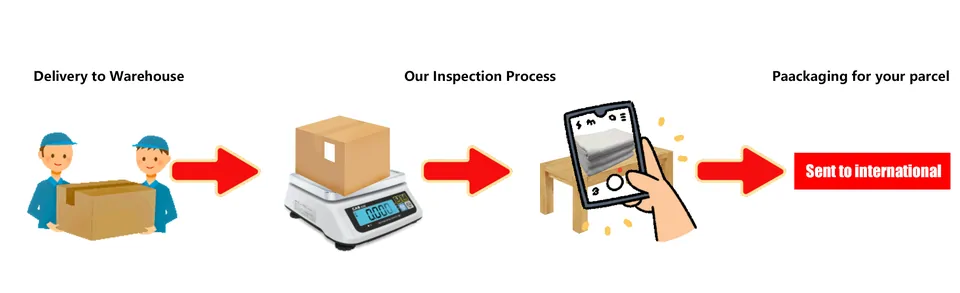
The wording rewards a slow read. Appearance covers model, style, and size, so a wrong colour may be visible; the photos still need your review. A wrong-chipset earbud does not: electronics are checked for none of authenticity, function, or quality, by the rule's own list. The eligible 120-hour return-request window runs from Stocked in. Photos can document a visible problem, but eligibility, seller terms and exclusions still govern the request.
Working with it
Where the photos live, and what to order extra
Reading the QC sets: default, paid, parcel
Three photo services exist and only one has a published count. The default QC set arrives with no fixed free-photo count found in the captured official pages. Personalised photos cost 2 yuan per piece and answer within 24 hours, which makes them the tool for the one angle you actually need: a date code, a stitch line, a serial window. The parcel photo is free, three shots of the outgoing box, and only taken if you tick it at parcel submission.
The practical order of operations: list your deal-breaker angles before the item lands, request them as paid photos the moment it stocks in, and keep the 120-hour window in mind while you wait.
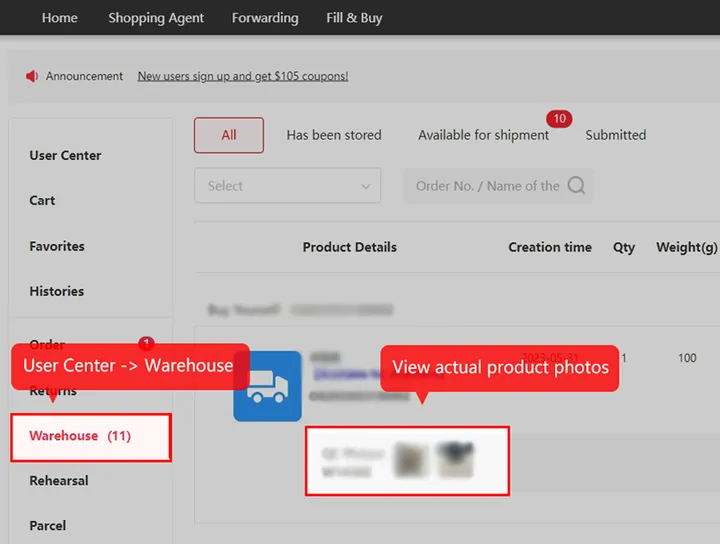
The return window the photos feed
The captured return policy gives eligible requests 5 days (120 hours) from Stocked in. Requesting within that window is not automatic approval. Storage availability follows its separate status and deadline. Ineligible from the start: custom-made items, items with removed tags, second-hand goods, undergarments, adult products, food, books, newspapers, items bought outside mainland China, and opened Special Standards items. The fee, when you are at fault, stacks shipping to the seller + shipping back + a per-month service fee tier that starts at zero for the first return of the month.
Read it before, not during
Most inspection disputes are not about what the warehouse did; they are about what the buyer assumed it would do. The article is under 200 words. Reading it before paying converts the free check from a guess into a known quantity, and the fit question becomes simple: does appearance-only cover this specific purchase.
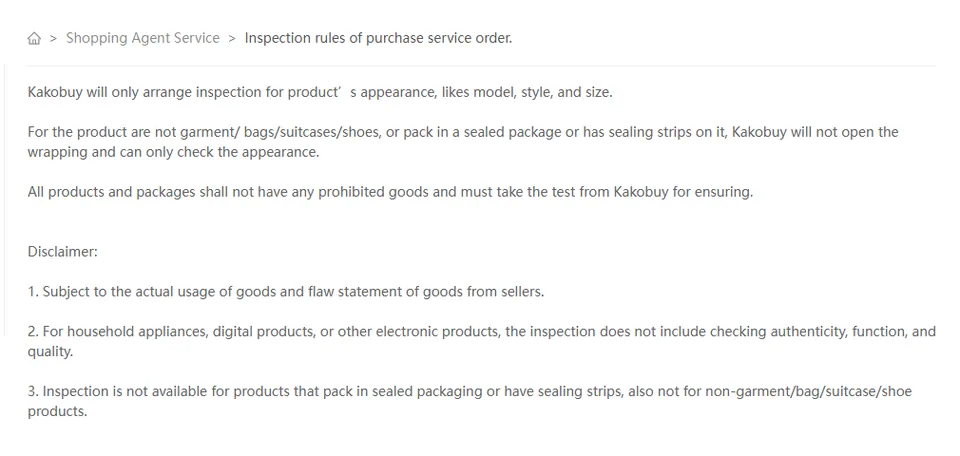
The disclaimer's third clause is the quiet one: inspection is simply not available for sealed or non-garment items, so confirm which extra photos, if any, are available for that specific item before relying on them.
How to review the QC photos
- Match the order: compare the photos with the exact colour, size, quantity and remarks you paid for.
- Inspect the visible details: look at seams, damage, marks and symmetry. For size, request a clear tape-measure photo of the dimension that matters; a size label alone does not show fit.
- Ask one precise question: “Please photograph the chest width with the tape flat” is more useful than “more QC”. Extra photos only answer what is visible.
- Act on a problem promptly: keep the order number, mark the issue on the relevant photo and contact support before the seller-dependent return request window closes.
GL and RL are community opinions, not authentication or a return authorisation. A stock-in timestamp, the storage period and a return-request deadline are three different pieces of information.